

SERVICES



How Databricks Lakeflow Connect Unlocks Enterprise Value from SharePoint Data
In today’s data-driven ecosystems, silos are the enemy of agility. Whether it’s marketing assets buried in SharePoint folders or operational logs scattered across cloud drives, fragmented data slows down insights and complicates governance. The Lakehouse architecture, pioneered by Databricks, offers a unified solution, combining the reliability of data warehouses with the flexibility of data lakes.
But to unlock its full potential, we need seamless ingestion pipelines that bridge these silos. That’s where Lakeflow Connect comes in.
What is Lakeflow Connect?
Lakeflow Connect is Databricks’ declarative ingestion framework designed to simplify and scale data onboarding. It supports a growing list of connectors, from cloud storage to enterprise platforms, allowing teams to define ingestion logic in YAML and orchestrate pipelines with minimal overhead.
Think of it as the glue between your data sources and your Lakehouse, with modularity, observability, and automation baked in.
Value of the SharePoint Connector
SharePoint is more than just a document repository. It’s a living archive of:
- Contracts, reports, and policy documents
- Excel files with operational metrics
- Project folders with versioned assets
- Meeting notes and collaborative content
For many organisations, SharePoint holds critical semi-structured and unstructured data that rarely makes it into analytical pipelines.
Unlocking SharePoint data is, for example, critical for Retrieval-Augmented Generation (RAG) because it gives large language models access to rich, domain-specific context (meeting notes, annotated spreadsheets, and internal reports) that typically live outside structured databases. By ingesting this content into the Lakehouse, organisations can ground LLM responses in real-world decisions, policies, and collaborative knowledge, enabling copilots and chatbots to deliver answers that are not just accurate, but deeply relevant to the enterprise.
The SharePoint Connector
The SharePoint connector, at the time of writing, is in beta. For most Databricks customers, it is possible to enable beta features. To enable the SharePoint connector, navigate to your profile icon in the top-right corner of the Workspace UI. In the dropdown menu, select Previews, then enable LakeFlow Connect for Sharepoint.
The Lakeflow SharePoint connector enables secure, scalable ingestion of files and metadata from SharePoint Online. It supports:
- OAuth-based authentication
- Folder-level filtering
- Incremental ingestion via file timestamps
- Metadata enrichment (e.g., author, modified date)
This connector turns SharePoint from a passive archive into an active data source.
Create a SharePoint Ingestion Pipeline
To use Lakeflow Connect connectors, including this SharePoint connector, we require some method to authenticate. To this end, we use a Connection in Databricks to store the credentials. In this case, the credentials are those of an App Registration that we must set up in Azure.
The SharePoint connector supports the following OAuth methods:
- U2M authentication (recommended)
- Manual token refresh authentication
Databricks recommends using U2M because it doesn’t require computing the refresh token yourself. This is handled for you automatically. It also simplifies the process of granting the Entra ID client access to your SharePoint files and is more secure.
The following steps are given for the recommended U2M authentication method.
Steps:
- In the Azure Portal, go to Microsoft Entra ID > Manage/App registrations > New registration
- Give the app registration a name, select “Accounts in this organizational directory only” if you only wish to ingest data from your own org, add the redirect url. To do this, select “web” as the platform and populate the redirect value with https://<your-databricks-workspace-url>/login/oauth/sharepoint.html
• 3. On the Overview page of the created application, click Client credentials : Add a certificate or secret > + New client secret. Create a new secret and store its value for use in subsequent steps.
Set Up a Connection Object
Set Up a Connection Object
The Connection object can be created in the Workspace UI.
Note that the following steps must be performed by an admin in your Azure org in order to grant the required permissions to the Entra ID app.
Steps:
- Navigate to: Catalog > Settings > Connection then Create Connection.
- Give the connection a name, select Microsoft SharePoint for the connection type. For Auth type, select OAuth.
- In the following section, add the following values:
- Client Secret: The value of the secret created for the app registration
- Client ID: Application ID of the app registration, retrieved from Overview
- Tenant ID: Directory ID of the app registration, retrieved from Overview
- Domain: The SharePoint instance URL in the following format: https://MYINSTANCE.sharepoint.com
- Sign in and grant the application the required permissions.
- Click Accept and then Create Connection.
Create Pipeline from Sample YAML
It is possible to create the pipeline using the Databricks REST API. In this example, we will be using a Databricks Asset Bundle yaml definition to promote an IaC approach.
The pipeline yaml is given as:
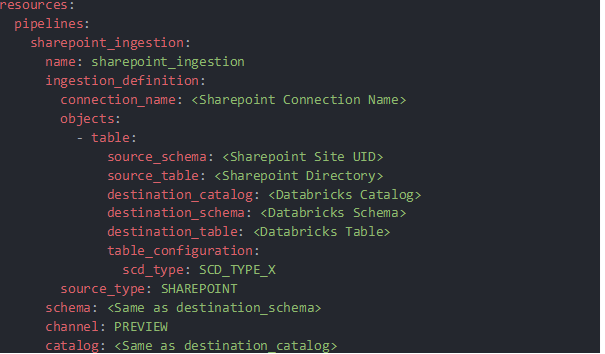
Most fields are self-explanatory. For scd_type, scd_type_1 or scd_type_2 are available.
The created pipeline ingests all files in the source directory and creates a streaming table that includes file metadata, SharePoint metadata, and the file content itself as bytes.
Downstream Actions
Depending on the use case or requirements of the organisation, the data stored in the ingestion table can be stored in different. In our case, given the connector is in beta, we wanted to focus on auditability and so recreated the ingested files from the bytes and saved them in a volume.
It is of course possible to work with the raw bytes directly for a more streamlined workflow.
To convert the bytes to files, we registered the following UDF:

Wrapping Up
Lakeflow Connect’s SharePoint integration is a game-changer for teams looking to make use of their enterprise data, in particular for enhancing their in-house LLM products. While in beta, the SharePoint connector can be enabled and you can ingest your SharePoint data into your data lakehouse today!